Case Study 2 - AI Interaction Design

Designing Trust First: A Framework for AI in a Clinical Product

A clinical product with AI already in it, and an open question about where it should go next. As the sole product designer, I defined how every future AI agent should behave — before any of them were built.

Role

Senior Product Designer, Sole Designer

Tools

Figma, design-first proposal, Claude

Timeline

3 months

Team & Context

Sole designer. The brief came from leadership as a single open question — "figure out where AI belongs", with no spec, no scope, and customers already wary of AI touching clinical data.

What I owned

Interaction Framework, Design Principles, Status Model, Agent Inbox, Prototyping, Dev Handoff

<10s

North star: Verify and approve an agent's work in under 10 seconds

4

Shared status states used across every agent type

0

Silent AI actions, the clinician approved everything

The Problem

The risk wasn't technical. It was trust.

Therasoft already had AI-assisted notes in the product. The question from leadership was broader: where does AI go from here, and how do we expand it without confusing customers or breaking the trust we'd already built? There was no spec and no defined scope — just an open question and the expectation that I'd find principled ground to build from.

Scattering new AI features across a clinical product without a consistent model would fragment the experience and amplify fears customers already had: what data is being captured, when is AI running, and can it be turned off. Some customers wanted AI removed from the product entirely. Getting the model wrong wouldn't just confuse people, it would erode the trust that kept them on the platform at all.

PHI & HIPAA

Any AI in a clinical product touches Protected Health Information. The design had to define exactly what the AI ingested, acted on, and discarded — so a clinician could never apply a diagnosis, note, or billing code to the wrong client.

No spec, no scope

The brief was a single open question. The framework had to exist — and be defensible — before anyone could build a single feature on top of it.

existing trust to protect

AI-assisted notes had already shipped. Whatever came next couldn't undermine the trust customers had cautiously extended to the AI already in the product.

active skepticism

This wasn't a neutral audience. Some customers wanted AI gone. The design had to earn their trust, not assume it.

The Approach

Define how AI behaves before defining what it does

Before any of that, I interrogated the premise itself. Leadership wanted AI, but my first job was finding where it genuinely helped — I asked the team and clinicians what took the most time each day, then tested which of those pain points AI could actually reduce, rather than adding features to satisfy a mandate. Only once I knew AI earned its place did the real question begin: how to add it without breaking trust.

I wrote a design-first proposal rather than a feature list. The goal was to establish how AI should behave, which guardrails were non-negotiable, and what the interaction model would look like across every agent type — before engineering began. The bet was simple: get the trust model right once and every future agent inherits it; get it wrong and each new feature compounds the problem.

Three principles anchored everything that followed — verification, user control, and visibility. They weren't framing language; they were the test each design decision had to pass. The HIPAA safeguards weren't a feature on top of that work. They were the precondition for the product existing at all.

The Solution- AI Side Panel

One entry point, context-aware, always in the clinician's control

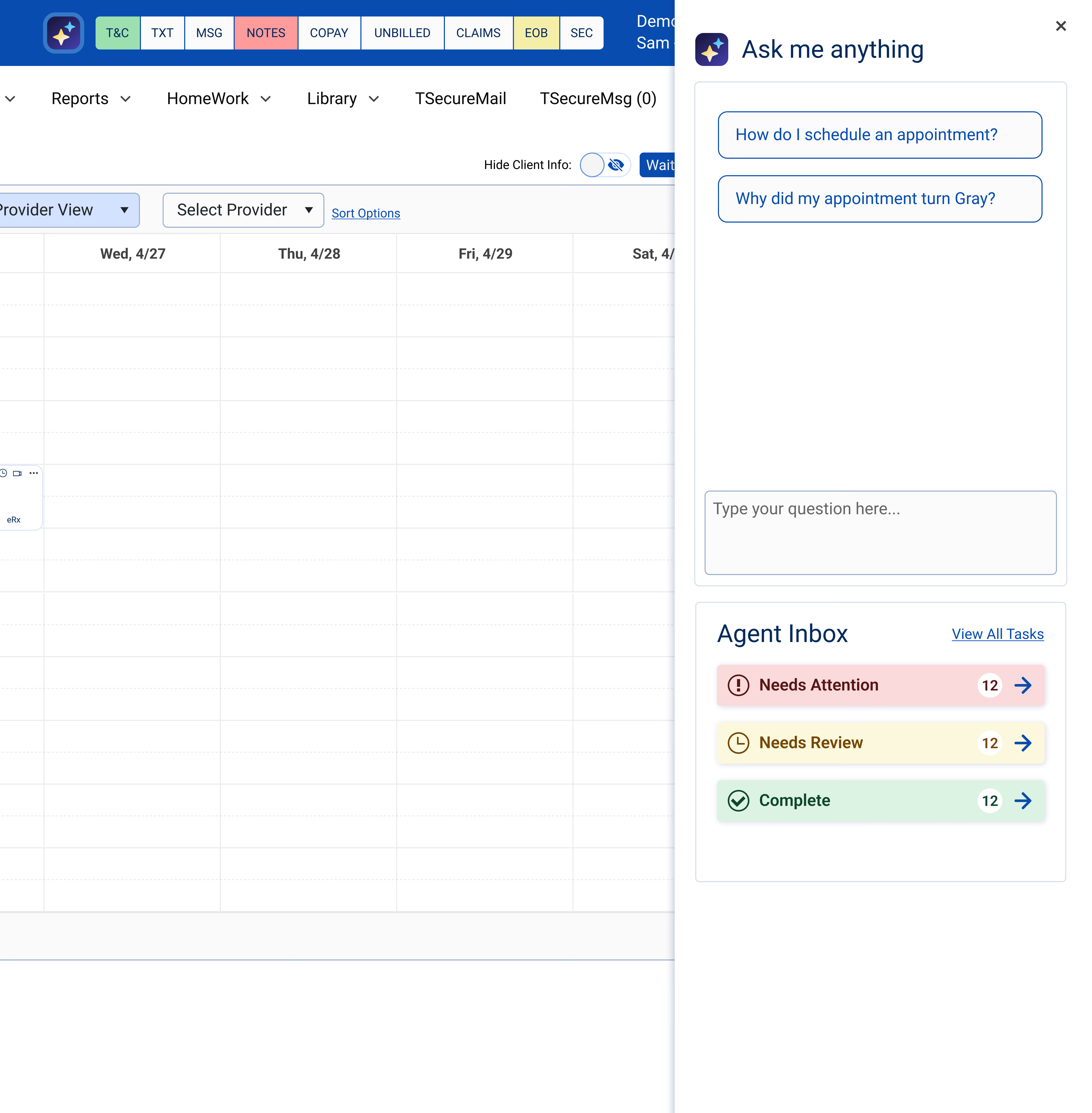
The default approach would have been to embed AI wherever it was useful, a button on the calendar, another in notes, another in billing. I rejected that early, because scattering AI across the product is exactly what would have amplified the fears customers already had: not knowing where AI lived, when it was running, or how to switch it off. So the framework did the opposite. One context-aware side panel became the single front door for everything AI — visible, predictable, and closable. The architecture was the trust principle made physical: if people are wary of AI being everywhere, the design answer is to make it live in one place they control.

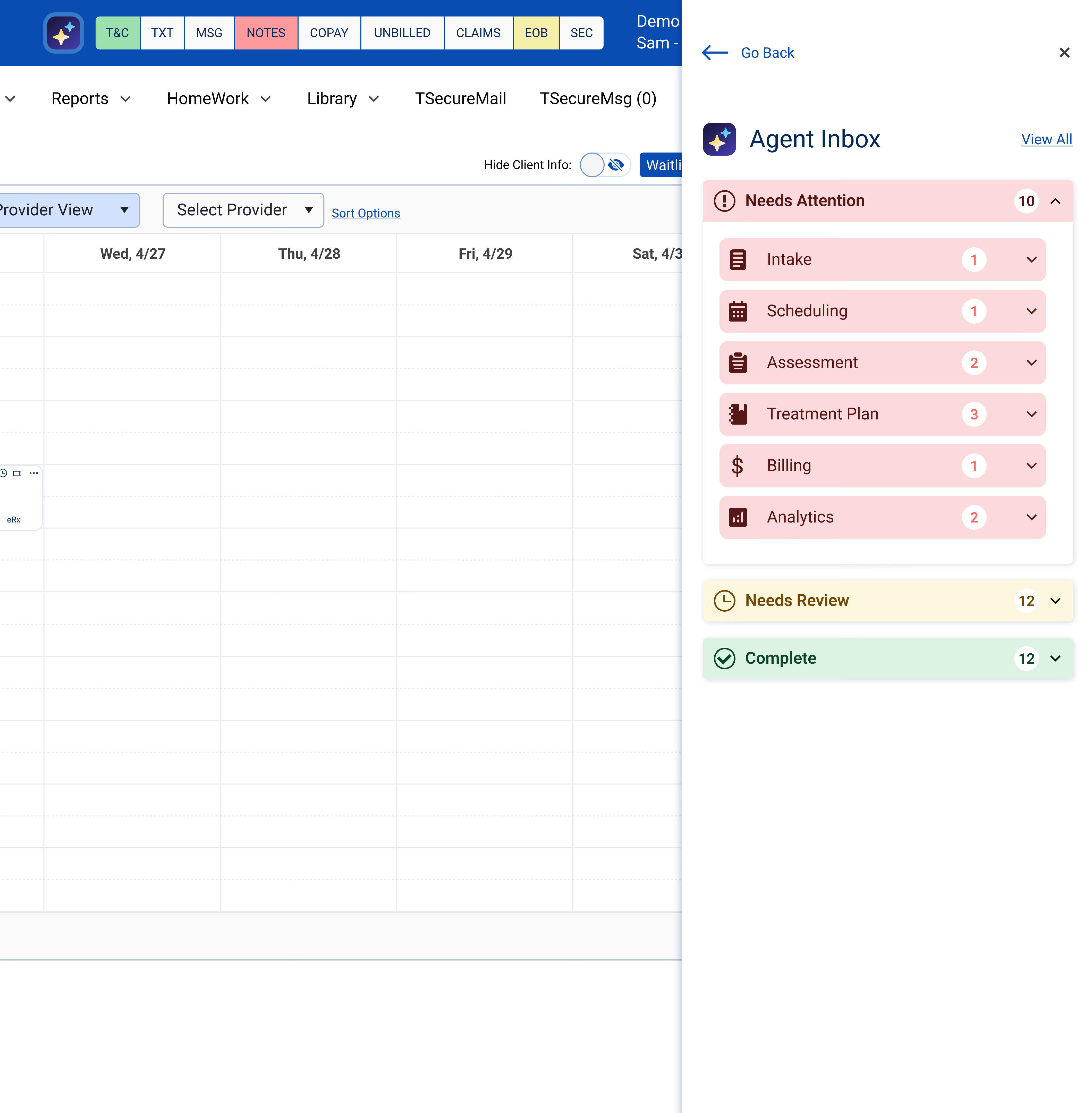
That panel reads the page you're on and pre-loads the questions you're most likely to ask before you ask them — on the calendar, it surfaces scheduling questions. One click into the agent inbox shows exactly what every agent has done, sorted by urgency: Needs Attention in red, Needs Review in amber, complete in green.
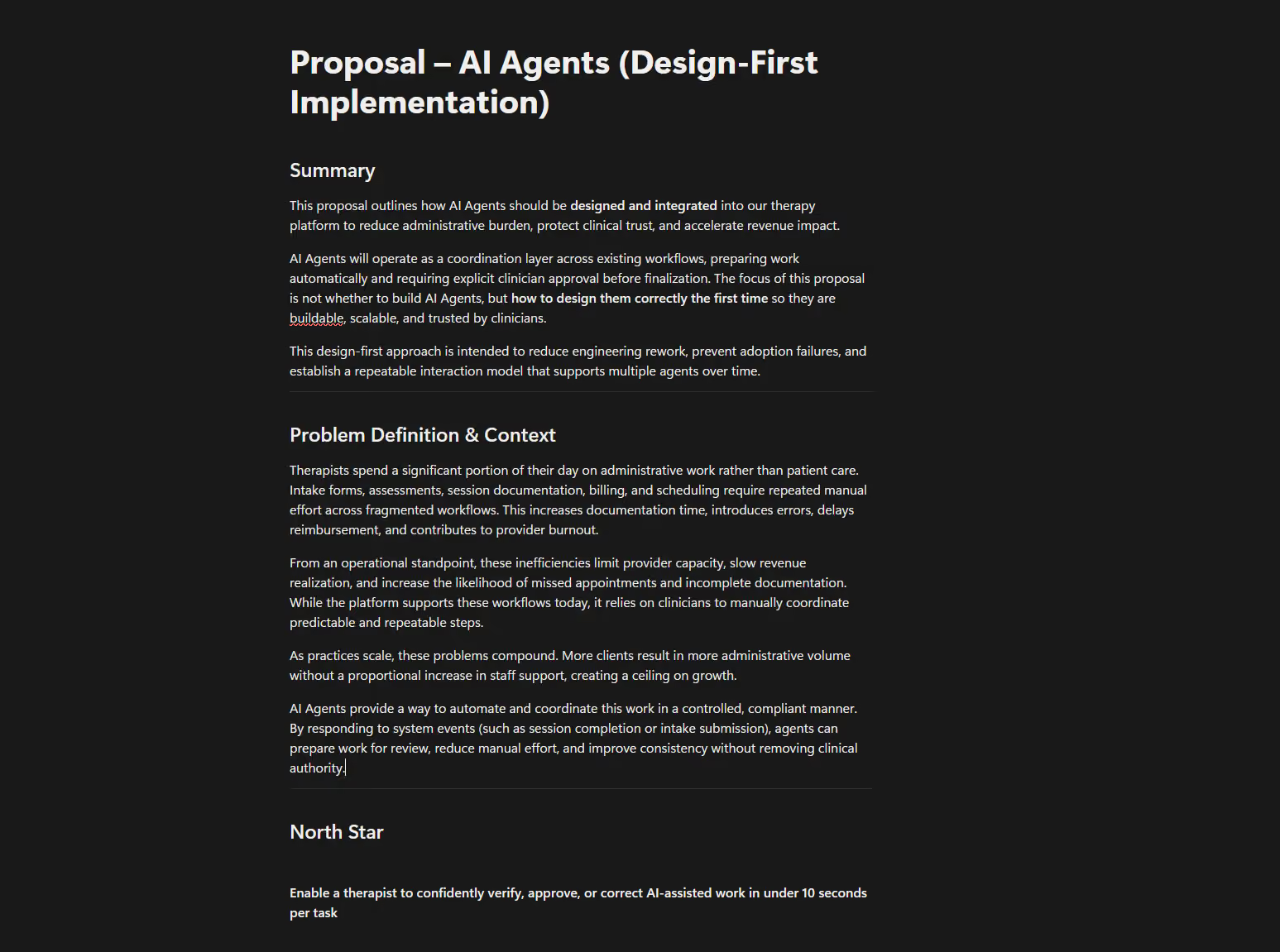
"The focus of this proposal wasn't whether to build AI agents — but how to design them correctly the first time, so they're buildable, scalable, and trusted by clinicians."

- From the original design-first proposal

The Outcome in Practice

Trust, designed in, changed the answer

The context-aware side panel shipped as the single AI entry point across Therasoft. Its questions were preloaded from the most frequently asked support queries, so it answered real user questions before anyone needed to call support.

The result that mattered most wasn't a metric — it was a reversal. Customers who had wanted AI removed from the product entirely chose to keep it, once they could see what it did, control what it touched, and turn it off when they wanted. The three principles established before any screen was built had done their job.

Process - Go Deeper

The decisions behind the framework

The sections below hold the fuller story — how I scoped an unscoped brief, the constraints that shaped the model, and the reasoning behind each principle.

01

First question: did we even need AI?

Interrogating the premise before designing a single feature

Leadership wanted AI in the product — that part wasn't mine to decide. But the instruction was a single sentence with no spec, and the easy failure mode was obvious: start bolting on AI features to satisfy the mandate, whether or not they helped anyone. So my first job wasn't to design AI. It was to find where AI genuinely earned its place, so I wasn't adding features for their own sake.

I grounded that in real friction rather than assumption. I asked the team and clinicians what actually took the most time in their day, then tested each of those pain points against a simple question: could AI meaningfully reduce this, or would good design alone already solve it? That distinction mattered — I didn't want AI rescuing flows I could fix with better UI.

Creating an appointment was the clearest example of the line. My calendar redesign had already made it faster through better hierarchy and fewer clicks — so AI wasn't there to fix a broken flow. But for a power user, natural language broke a ceiling that interface design couldn't: a single typed sentence — "add a recurring monthly appointment for John Doe on Oct 17, charge his card on file" — collapsed a multi-field, multi-step task into one action. That's where AI clearly belonged: not patching the floor, but clearing a ceiling good UI had already reached.

Principle: AI earns its place by breaking ceilings good design can't reach — not by patching problems better UI already solves.

02

The HIPAA constraints as the design foundation

Defining what the AI ingents, acts on, and discards

Any AI in a clinical product touches Protected Health Information, which made the data model a design problem, not just an engineering one. The framework had to define precisely what the AI ingested, what it was allowed to act on, and what was discarded from memory immediately — so that a clinician could never accidentally apply a diagnosis, a note, or a billing code to the wrong client.

I treated these safeguards not as a feature layered on at the end, but as the precondition for the product existing at all. Every interaction in the framework was designed assuming the data boundaries came first.

03

Three principles, set before any screen

Verification, user control, and visibility of system status

Verify in under 10 seconds. The north star: a clinician should be able to understand what an agent did and confirm any required action in ten seconds or less, without leaving confused. The review experience itself had to be fast, clear, and unambiguous every time.

User control and freedom. AI must never silently finalize work. Every action is clearly labeled, reversible, and explicitly approved — the clinician stays the final decision-maker at all times.

Visibility of system status. Therapists must always understand what an agent did, what it used, and what state it's in. The proposal defined four shared status states used across every agent: Ready for Review, Blocked, Needs Attention, and Approved.

These three principles became the test every later design decision had to pass — not framing language, but a working filter.

04

The context-aware panel

Reading the page to answer questions before they're asked

Rather than a generic chat box, the panel reads the page the clinician is on and pre-loads the questions most relevant to that context. On the calendar, it surfaces scheduling questions; the preloaded prompts were drawn from the most frequently asked support queries, so the panel answered real questions before anyone had to contact support.

The design intent was to make a single, predictable entry point for everything AI — so customers never had to wonder where AI lived, when it was running, or how to reach it.

05

The agent inbox, sorted by urgency

One view of everything the agents had done

One click from the panel opened the agent inbox: a single place showing exactly what every agent had done, sorted by urgency rather than by time or type. Needs Attention surfaced first in red, Needs Review in amber, and completed work in green — the same four status states applied consistently across intake, scheduling, assessment, treatment plans, billing, and analytics.

The consistency was the point. A clinician learned the status language once and it held everywhere, which is what kept the ten-second review standard achievable as more agent types were added.

06

What carried forward

The honest scope of what shipped, and what lasted

My version of the panel was live for about a month before the product direction changed. I won't overstate the shipped lifespan — but the part that mattered outlived the specific release. The interaction model, the panel architecture, the status model, the agent icons, and the three principles all carried forward as the base pattern for Therasoft AI.

What I'd carry into the next version: more direct validation with the most AI-skeptical customers earlier in the process. The reversal — skeptics choosing to keep AI — happened after launch; getting those users into the loop before launch would have made the trust case even stronger, and faster.

Outcome

The framework outlasted the feature

The panel, the status model, the agent icons, and the interaction principles became the base pattern for Therasoft AI. The product direction changed after my involvement ended — but what was built next was built on this foundation.

The lasting lesson: in a product where users are actively skeptical, trust isn't a tone you write into the copy — it's a structure you design into the behavior. Define how the system has to behave first, and the features that follow are trusted by default instead of fighting for it one at a time.