Case Study 3 - Mobile UX - Patient-facing

Patient Portal Clarity: Why I Showed Patients Less

A patient portal that had grown to show everything, on the assumption that more visibility meant more value. I cut it back to the two things patients actually came for — and designed it mobile-first, because that's where patients actually are.

Role

Senior Product Designer, Sole Designer

Tools

Figma, Claude AI

Timeline

3 months

Team & Context

Sole designer, working with clinicians and the team who knew firsthand what patients struggled with and asked for. The portal had accumulated features over years with no one asking whether patients needed them.

What I owned

Mobile-First Design, Information Architecture, Scope Reduction, Payment UX, Prototyping, Dev Handoff

2

Daily tasks the portal optimizes hardest for: check the next appointment, pay the balance

3

Layers of financial detail reviewed and reduced to a single balance

0

One dashboard unifying the patient's key actions: book, pay, complete intake

The Problem

A portal built on an assumption nobody had checked

The patient portal had grown the way most products do — feature by feature, each added because it could be, not because anyone confirmed a patient wanted it. Session costs, insurance payment details, per-appointment pricing, documents, superbills, a feedback module: all of it sat in front of patients on the assumption that more visibility meant more value.

The question I kept returning to wasn't "how do we make this look better." It was "what does a patient actually open this thing to do?" Working with clinicians who knew exactly what their clients struggled with and asked for, the answer sorted cleanly: day to day, patients did two things — checked their next appointment and paid what they owed. Booking and intake mattered too, but they were periodic, not daily. Everything beyond that small set of actions was noise patients hadn't asked for and had to navigate around.

Assumed, Not Validated

Features had accumulated on the belief that showing more served patients. No one had asked whether the added visibility helped or just added friction.

Payment Confusion

The portal exposed session cost, insurance payments, and per-appointment pricing — when patients overwhelmingly just wanted to pay down a balance, the way most patient portals work.

Booking Meant Asking

There was no real self-service booking. Patients had to message or call to find a time — left wondering "so when can I actually book?" instead of just seeing what was open.

Unclear Mobile Entry

On the app, choosing "I'm a patient" left users unsure where they'd landed — the patient and provider flows shared a login with no clear sense of place afterward.

The Approach

Decide what to remove before deciding what to design

The work wasn't to add a better portal; it was to subtract down to the real one. I started from how comparable patient portals behave (most show only a copay, not a full financial breakdown) and from what the clinical team knew patients actually requested, then made deliberate cuts: remove session cost and insurance payment detail from the patient view, strip pricing out of past appointments entirely, and reframe payments around paying down a balance rather than line-by-line per appointment.

Then I chose mobile-first, not as a default but as a decision. The patient userbase lives on their phones; they book, pay, and check appointments on the move, the same way they handle everything else. Designing for the desktop first and shrinking it down would have optimized for the device patients use least. So the phone was the primary canvas, and everything was designed to work there first.

Subtraction wasn't the whole job, though. Where patients genuinely lacked a capability — real self-service booking — I built it. The skill wasn't only knowing what to cut; it was knowing the one thing worth adding, and adding it without reintroducing the complexity I'd just removed.

The Solution- The Dashboard

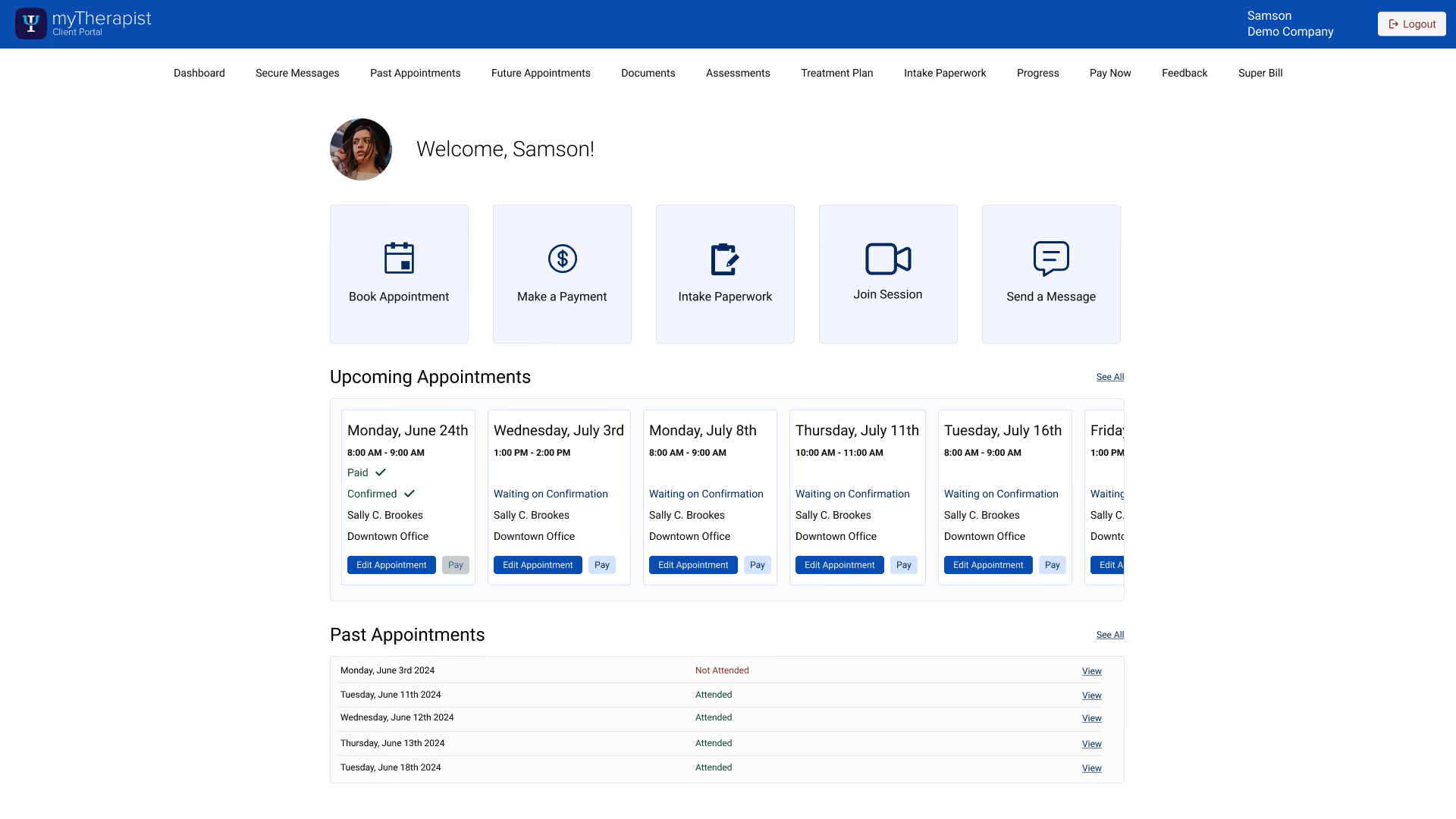
One home screen, three actions, no hunting

The redesign's backbone is a single dashboard that puts a patient's key actions one tap away: book an appointment, pay, and complete intake paperwork, all from one place instead of scattered across pages a patient had to learn. It opens on what matters daily — the next appointment and a clear balance with one way to pay it. Past appointments show their details cleanly, and payment is reframed around the balance, so patients can pay in full or in part without reasoning about session costs and insurance math that was never theirs to untangle.
"Show what's open, never reveal what's taken"

- Design principle behind the booking flow
The Work — Self-Service Booking

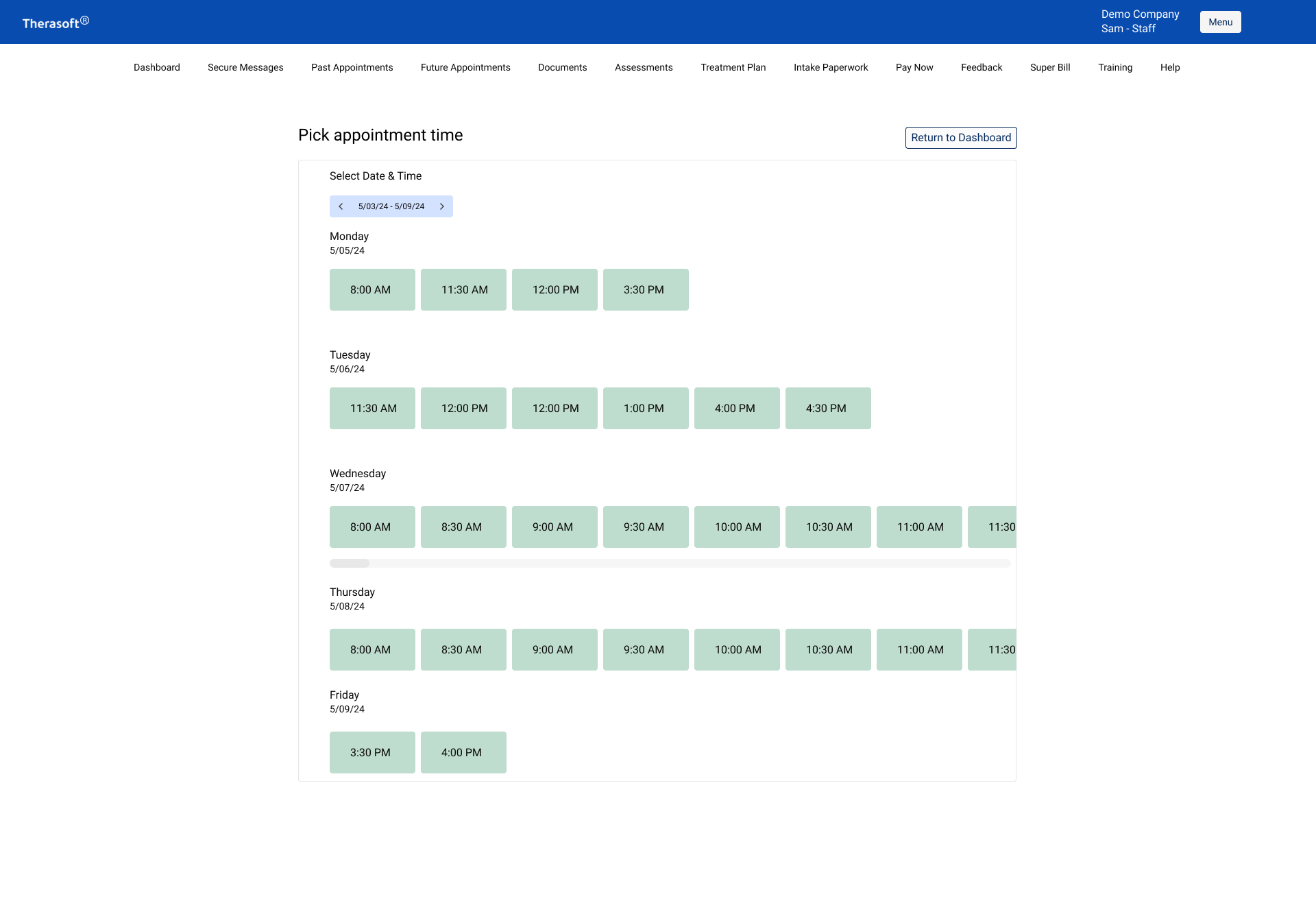
Show what's open, never reveal what's taken

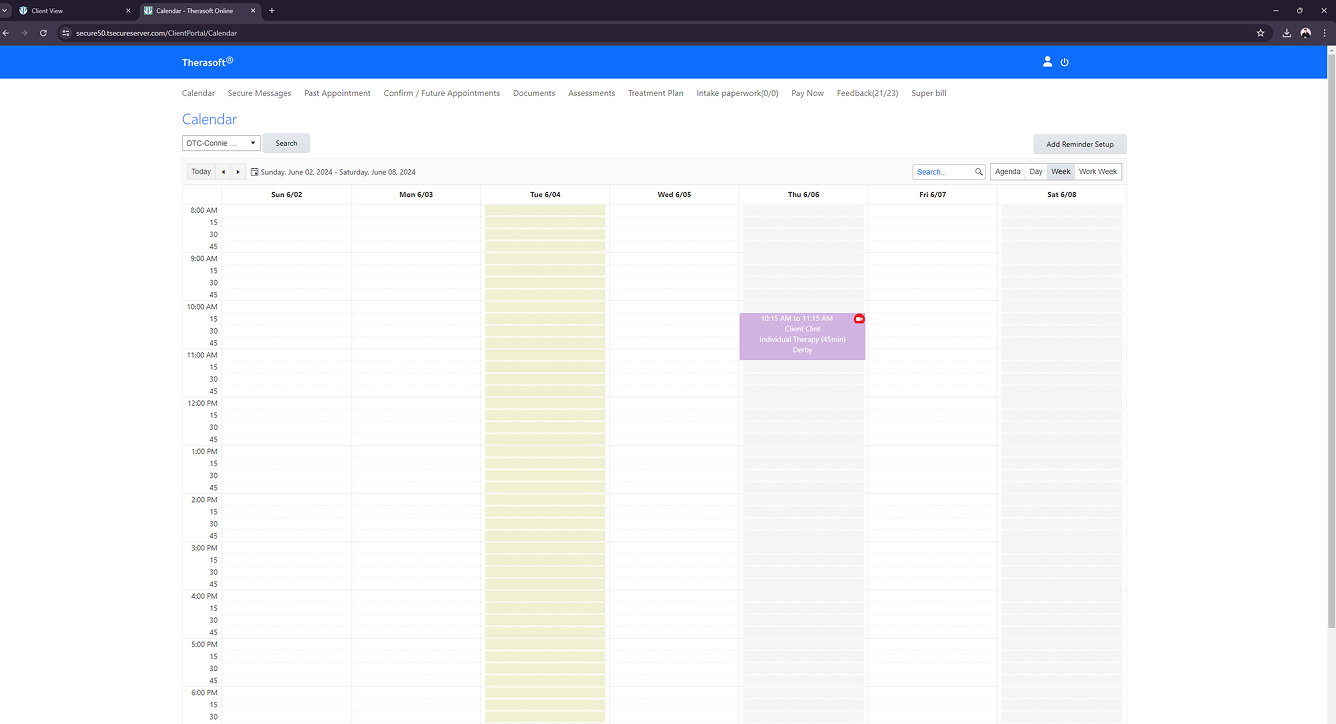
The booking flow existed before the redesign — technically. Patients landed on an open calendar with no indication of what to do next: nothing signaled that clicking a date was how you requested an appointment, and nothing guided you toward booking at all. Patients who couldn't decode the screen fell back to messaging or calling the practice, which meant the feature was failing at the exact job it existed to do. That failure is what drove me to rebuild the booking flow as a guided path instead of a silent calendar.

But the harder call wasn't whether to show availability — it was what not to show. A patient doesn't need a full calendar, and they absolutely shouldn't see when a clinician is booked. Showing booked time, even as a blocked-out slot, quietly leaks information: it implies other clients, exposes a clinician's private schedule, and turns a booking screen into a surveillance surface. So the design shows only available times, and never indicates that a clinician is busy at any specific time. The patient sees what's open and picks from it.

Process - Go Deeper

The decisions behind the work

The sections below hold the fuller story — how I decided what to remove, why payments got reframed, the rules behind self-service booking, and why mobile-first was a deliberate call.

01

Starting from "what is this actually for?"

Naming the portal's real job before touching the design

Before any redesign, I needed agreement on what the portal was even for. The honest answer, repeated across team discussions, was narrower than the product implied: patients use it to make payments and to check on appointments. That single framing — "the portal is for making payments" — became the filter for every later decision about what stayed and what went.

This is the part people skip. It's tempting to start improving screens immediately, but improving a screen that shouldn't exist is wasted work. Establishing the portal's actual purpose first meant the redesign was about removing the wrong things, not polishing them.

Filter: if a feature didn't serve viewing an appointment or paying a balance, it had to justify its place — or leave.

02

Why I cut the financial detail

Copay and balance in, session cost and insurance math out

The portal had been exposing session costs, insurance payment details, and per-appointment pricing. Two things made cutting them the right call. First, comparable patient portals overwhelmingly show only a copay — patients aren't trying to audit a ledger, they want to know what they owe and pay it. Second, the clinical team confirmed patients wanted to pay down a balance, not reconcile individual appointments against insurance.

So I reframed the whole money view: show copay and the session balance, let patients pay the balance in full or in part, and remove pricing from past appointments entirely. The insurance and session-cost detail didn't belong in front of the patient — it was complexity that was never theirs to untangle, and showing it created hesitation, not transparency.

03

Why mobile-first was a decision, not a default

Designing for where patients actually are

Mobile-first gets said reflexively, as if it's just how things are done now. I didn't choose it that way. I chose it because the patient userbase lives on their phones — they book, pay, and check appointments on the move, the same way they manage everything else in their lives. The provider side of the product is a desktop, sit-down, do-focused-work tool. The patient side is the opposite: quick, mobile, in-between-things.

Designing desktop-first and shrinking down would have meant optimizing for the device patients use least, then compromising the experience on the one they actually hold. Starting from the phone forced the right constraints early — what truly earns a place on a small screen in a distracted moment — and those constraints reinforced the same answer the scope work had reached: two core tasks, made obvious.

Principle: design for the device and the moment your user is actually in — for patients, that's a phone, on the move.

04

The scheduling rules behind self-service booking

Practice policies, confirmations, and a bug I caught testing my own flow

Self-service booking only works if it respects how each practice actually operates. Cancellation policies differed by practice, so rather than hard-code one rule, the design accommodated practice-level settings — confirm and decline actions appeared only when a practice enabled them, and editing an appointment was restricted once it was confirmed with the provider. Cancellation requests carried timestamps, and within the policy window the flow pointed patients to call rather than silently cancel.

Testing the booking flow myself surfaced a real failure: there was no way to edit an appointment you'd just booked but that wasn't yet confirmed. Pick the wrong time and you were stuck — trying to immediately reschedule threw an error, leaving a patient to either double-book or call the provider to fix it. I'd never have found that from a static mockup; it only showed up by walking the actual flow end to end, and I flagged it as a fix rather than letting it ship as a dead end.

I also tightened consistency that had drifted: client name and provider name needed to read the same way everywhere they appeared — small, but the kind of inconsistency that quietly erodes trust in a tool patients use to manage their care.

05

The mobile orientation problem

"I'm a patient" — and then what?

Working in the mobile flow directly surfaced an orientation failure: the patient app and provider app shared the same login screen, so choosing "I'm a patient" dropped users somewhere that looked almost identical to where a provider would land, with no clear confirmation of which experience they were in. Related issues compounded it on the provider side — no clear logout, no indicator of the current account, a missing side navigation.

These are the kind of problems that stay invisible until you treat mobile as the primary surface and walk the real entry path. The fix direction was about establishing a clear sense of place immediately after the patient/provider choice, so a patient never had to wonder whether they were in the right app.

06

What I'd validate next

The open questions I'd want answered

I'll be straight about the limits of what informed this. The scope decisions were grounded in clinician knowledge and competitor norms, not in direct patient interviews — and the next thing I'd want is hard usage data I was still chasing: how many patients use the portal versus the mobile app, how often they log in, and which of the removed features anyone actually missed. Those numbers would either confirm the cuts or flag one I got wrong.

That's the honest next step. The redesign was a defensible bet built on the best information available — the strongest version of it would close the loop with real patient-side analytics before calling any cut final.

Outcome

Knowing what to remove or add

Two moves carried the redesign. I cut the financial clutter that confused patients, collapsing a tangle of session costs and insurance detail into a single clear balance. And I built the one capability they actually lacked: real self-service booking that surfaced open times directly, so no one had to ask "when can I book?" and no one ever saw when a clinician was busy.

The lasting lesson is that knowing what to remove and knowing what to add are the same skill. Anyone can pile on features; the harder calls are deciding what a patient doesn't need to see, and then adding the rare thing that's missing without dragging the old complexity back in. The booking flow did both at once: show what's open, hide what's taken, and let a patient act in one tap.